Many clients come to me with the same sentence: "I need an app". Once we talk it through, we almost always find that what their business really needs is a well-built web application that works on a phone like an app, without going through the app stores. Here's the difference, when each option makes sense and how I decide on my own projects.
What most small businesses need: a responsive web application
A responsive web application opens in the browser and adapts to any screen: phone, tablet or computer. For a small business, the advantages are very concrete:
- Nothing to install: a link and a password are enough.
- One single codebase for every device, which lowers both development and maintenance costs.
- Instant updates: if I fix something today, every user gets it when they reload the page.
- Visible on Google: the public parts (catalogue, bookings, contact forms) can show up in search results.
A real example: a CRM used every day from the phone
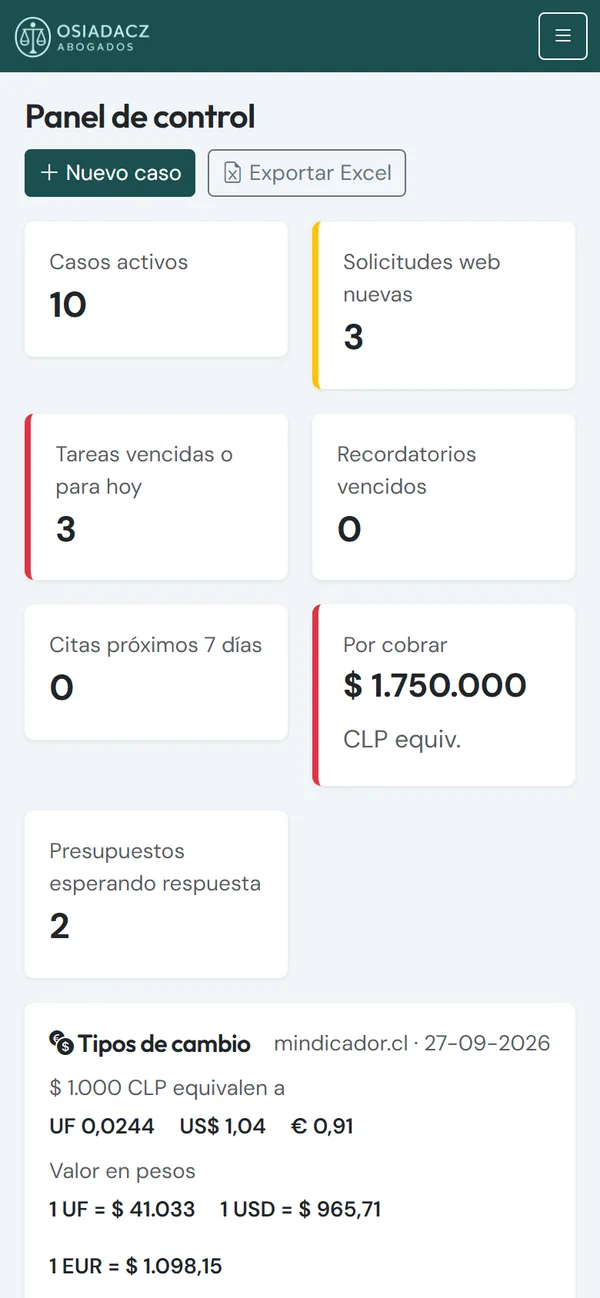
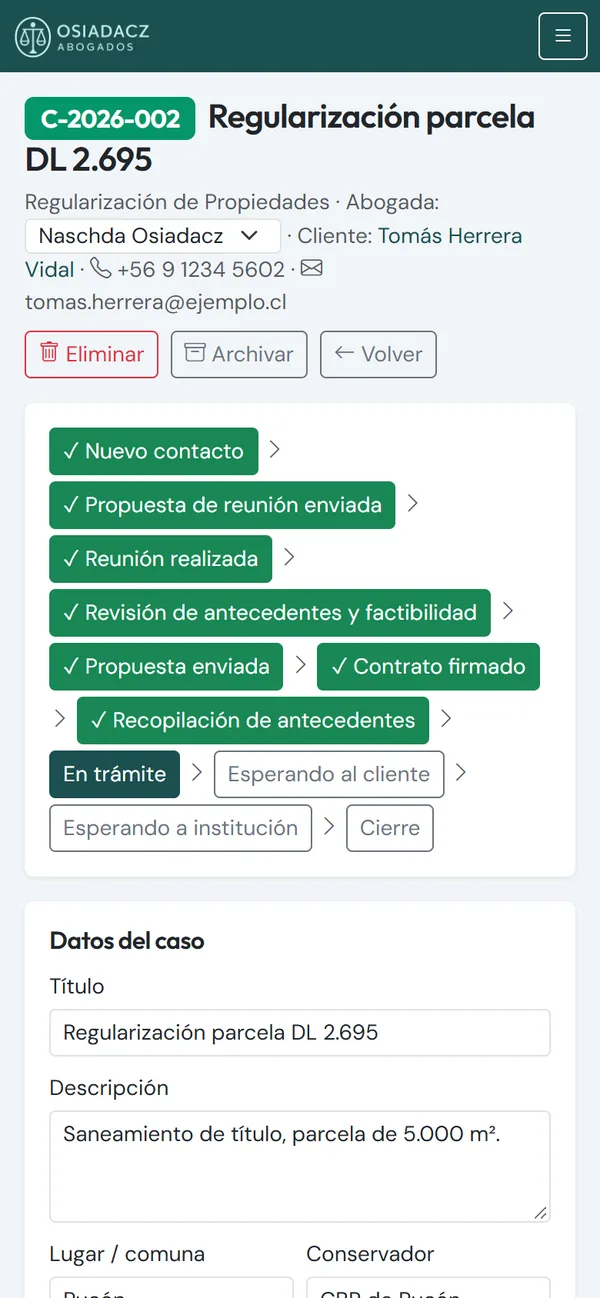
The custom CRM I built for a law firm is a responsive web application. The team uses it every day from the computer and from the phone too: the dashboard with what's urgent today, and each case file with its stages and tasks.
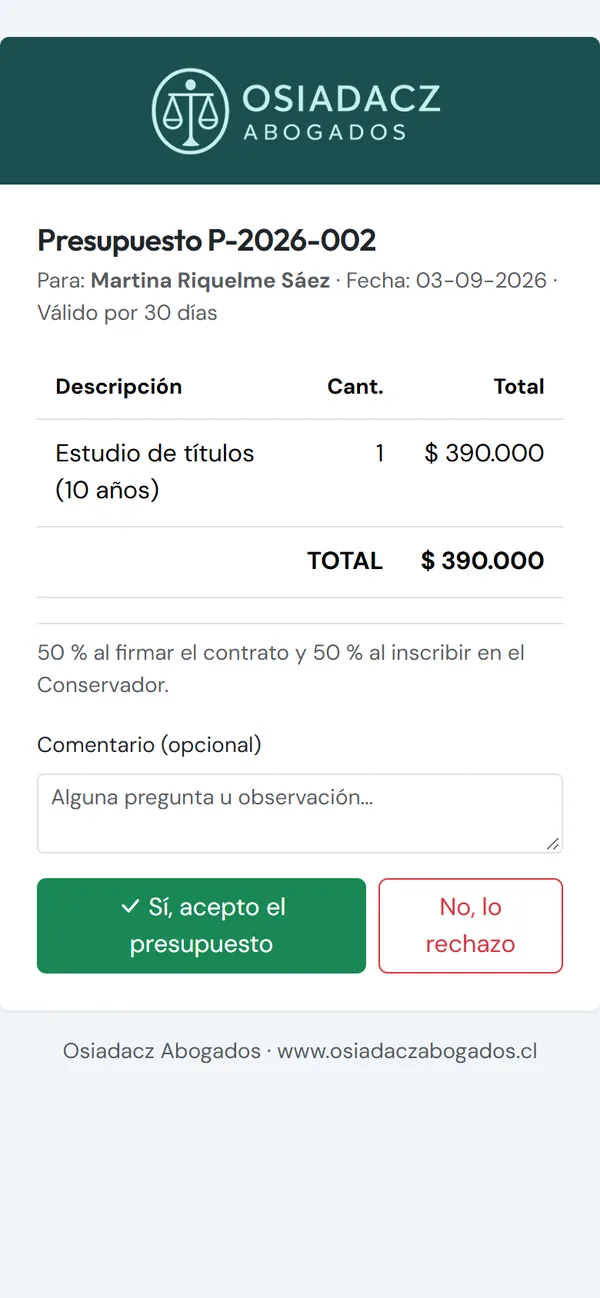
And the firm's clients accept quotes online from their own phone, without downloading anything. Nothing had to be published in a store, and nobody had to be asked to install or update an app. I go into detail in my article on custom CRMs for law firms and accountants.
When a native app is worth it
A native app is installed from the App Store (iOS) or Google Play (Android). Before deciding, it's worth knowing what that involves:
- Two stores, each with its own developer account and fees.
- A store review before every update.
- Often two codebases (one per platform) or a cross-platform framework.
- Users have to install it and keep it updated.
It's worth it when the application needs to:
- work fully offline;
- make intensive use of GPS, the camera or other sensors;
- run demanding graphics, such as a 3D game;
- send frequent push notifications;
- or when the app itself is the product.
One of my own cases: WindRush, my 3D windsurf and kitesurf game for Android, built with Godot and C#. There, native makes complete sense: 3D graphics, touch controls and performance. I tell the story in the WindRush article. And when the screen is a TV, as with the Roku apps I develop (article in Spanish), the platform calls the shots too.

The middle ground: the PWA
A PWA (progressive web app) is a web application that can be added to the home screen with its own icon, work partly offline and, on many devices, receive notifications. It's a good middle ground, with one caveat: support varies by platform, especially on iPhone (iOS). Before betting everything on a feature, test it on the phones your customers actually use.
Quick comparison
| Web app | Native app | PWA | |
|---|---|---|---|
| Installation | None: a link is enough | From the App Store and Google Play | Optional: add to home screen |
| Development cost | Lower (one codebase) | Higher (two platforms, stores) | Lower, close to a web app |
| Updates | Instant for everyone | Store review, then users must update | Instant |
| Google visibility | Yes, for public pages | Limited to the store listing | Yes, for public pages |
| Offline | Limited | Full | Partial |
| Hardware access | Basic (camera, location) | Full (GPS, camera, sensors) | Basic, varies by platform |
| Time to launch | Shorter | Longer | Short |
My advice: start with the web and measure
- Start with a responsive web application: it launches sooner and costs less.
- Measure real use: who uses it, on which device and for what.
- Go native only if a concrete need appears that the web can't cover.
For example, an online appointment booking system works perfectly as a web application, and many repetitive tasks you can automate don't need an app at all. If you have a project in mind, take a look at my custom software development service: I'll tell you honestly which format suits your case.
Got an app or web application project?
Tell me about it: I'll advise you for free and tell you honestly which format fits, web, PWA or native.
Let's talk about your projectMessage me on WhatsApp